Basic actions
Flower provides a set of actions that can be dispatched to move inside a flow and to update it's state.
These actions are:
flower/nextflower/prevflower/prevToNodeflower/nodeflower/resetflower/destroy
flower/next
When dispatched, this action moves to the next step inside a flow, adding a new node in the flow's history. It requires the name of the flow in the payload.
dispatch( {
    type: "flower/next",
    payload: {
        flowName: "MyFlow"
    }
})
flower/prev
When dispatched, this action moves back to the previous step inside a flow, adding the new node in the flow's history. Like the previous actions, we have to pass the name of the flow in the payload.
dispatch( {
    type: "flower/prev",
    payload: {
        flowName: "MyFlow"
    }
})
flower/prevToNode
This action allows you to navigate back to a specific step within the history of a flow. Unlike the flower/prev action, this action lets you return to a specific step by passing the node ID in the action's payload, without creating a new node in the flow's history. This is because you are going back to a node that already exists in the flow's history, rather than adding a new step to it.
dispatch( {
    type: "flower/prevToNode",
    payload: {
        flowName: "MyFlow",
        node: "aj2Hnak22HHbbaj"
    }
})
flower/node
This action allows you to navigate to specific step within a flow, that's not directly linked with the current step. To do that, you need to know the ID of the destination node.
dispatch( {
    type: "flower/node",
    payload: {
        flowName: "MyFlow",
        node: "aj2Hnak22HHbbaj"
    }
})
flower/reset
This action resets the history of the flow to the initial state.
dispatch( {
    type: "flower/reset",
    payload: {
        name: "MyFlow"
    }
})
flower/destroy
This action destroys a flow, and it's always dispatched when you move between flows. If you want to keep the history of the flow
without destroying it, you have to set to false the prop destoryOnUnmountof the Flower component.
dispatch( {
    type: "flower/destroy",
    payload: {
        name: "MyFlow"
    }
})
These actions are very important because they allow us to navigate within a flow, depending on the conditions that we have established. For example, in the scenario below, we can set different paths depending on the result of an operation.
Let's say we have a registration form in the first node. This form may have a save button that is only activated once the form has been completed and validated. The action associated with this button could be flower/next, which would move the user to the next step in the registration saga.
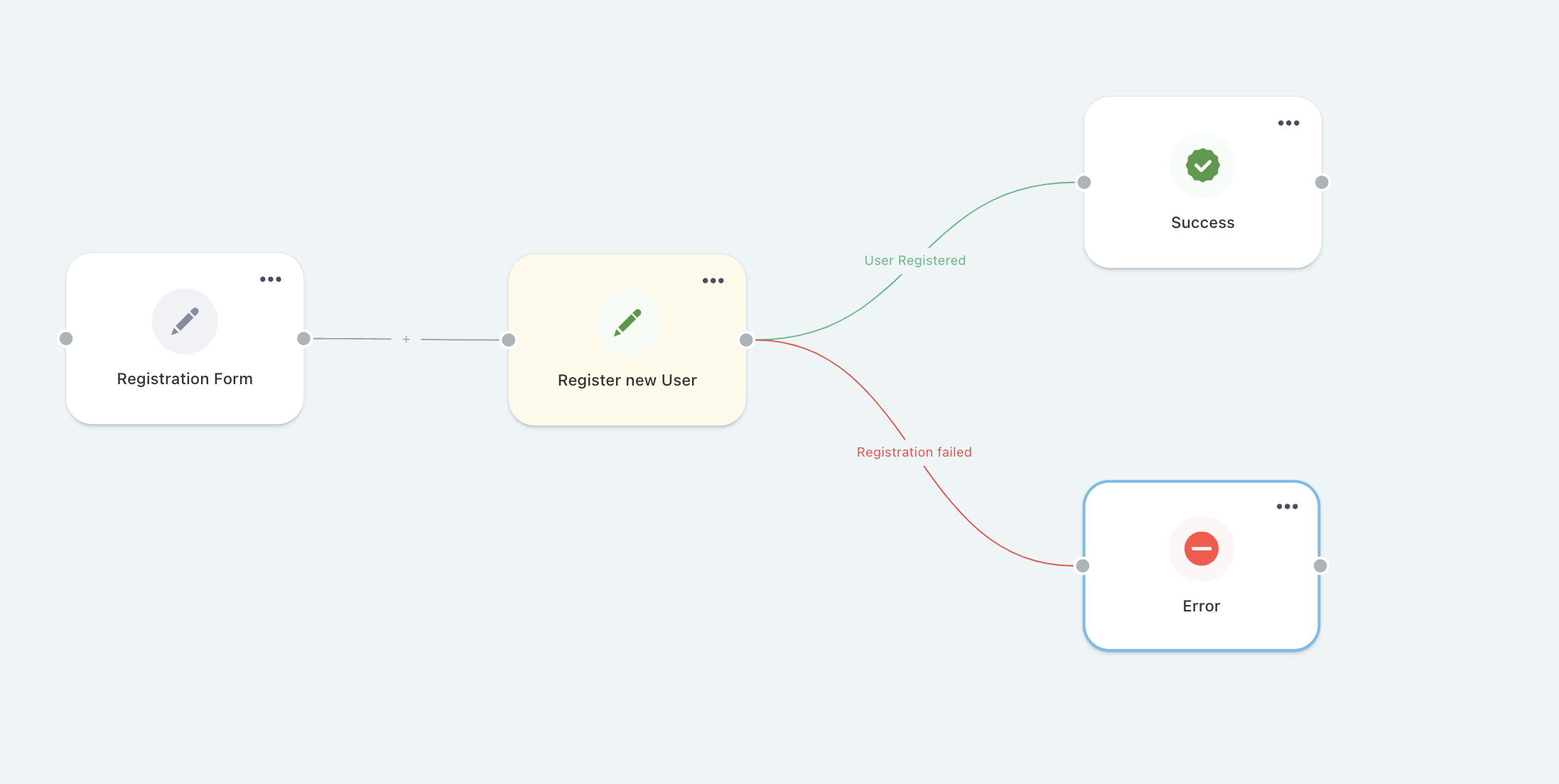
In the saga, we retrieve the new user's data and call the database insert function. Here, we can determine where to move within the flow, based on the outcome of the operation. For example, if the operation is successful, we can move to the success node, where we inform the user of the result. If there is an error, we can move to another node that informs the user that something went wrong.
function* registerNewUser({
  payload
}) {
  const { flowName } = payload;
  try {
    const userData = yield select(selectNewUser);
    const { data } = yield call(addNewUser, userData);
    yield put(updateNodeData(flowName, "success", true));
  } catch (e) {
    yield put(updateNodeData(flowName, "error", (e as Error).message));
  } finally {
    yield put({ type: "flower/next", payload: { name: flowName } });
  }
}
It's important to note that what we're doing in this case isn't the only solution. For instance, we may choose to redirect to a different page in case of success, destroying the current flow. Or, in case of an error, we may want to go back to a specific node, such as the one containing the registration form. The flower's actions, described in this section, allows us to perform all of these operations.